Skip to content
LogoTechnipages
LogoTechnipages
  • Topics
        • Android
        • Browsers
        • Gaming
        • Hardware
        • Internet
        • iPhone
        • Linux
        • macOS
        • Office
        • Reviews
        • Software
        • Windows
        • Definitions
        • All Recent Posts
  • Product Reviews
  • About

How to Know What Version of an Android App You’re Using

Judy SanhzJuly 7, 2022 Comments (0)
Android Apps

You find out that your favorite app received a new feature. But, you’ll only be able to use it if you use a specific app version. You don’t see any pending updates, so you’re unsure if you’re using the latest version.

How to Check What Version of the App You’re Using

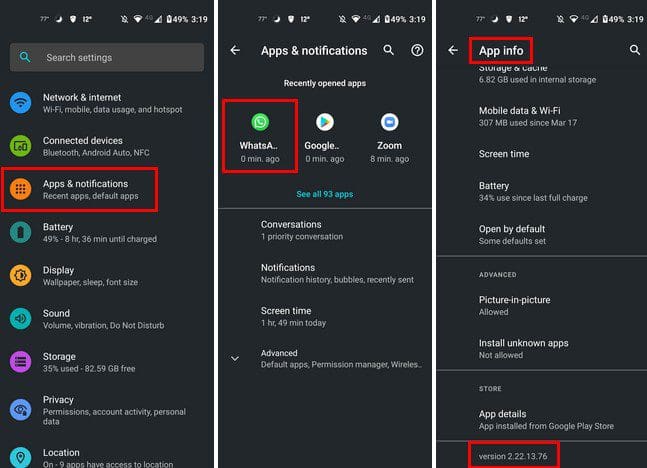
The good news is that you won’t need to install another app to check what version you’re using. You can check what version of an app you’re using by going to your device’s settings. Once you’re in Settings, go to Apps and notifications and look for the app whose version you want to check. For example, let’s say you want to see what version of WhatsApp you’re using.
Check app version

Once you select the app, you’ll be in App Info. Swipe to the bottom. The last option will tell you what version of the app you’re using.

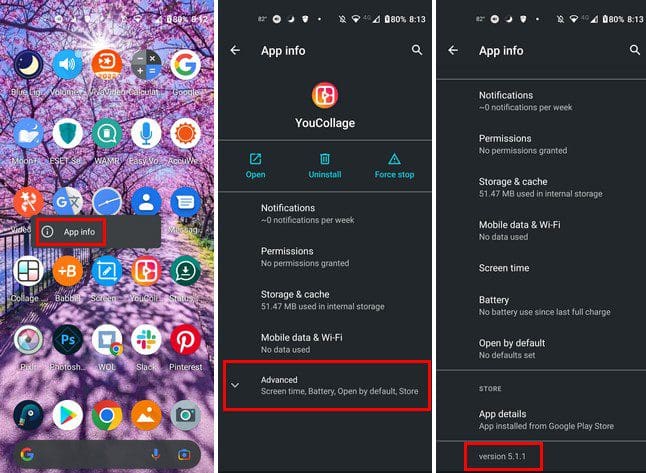
Another shorter way you can check what version of an app you’re using is by long-pressing on an app icon on your home screen. Tap on the app info icon (i), and you’ll end up in Settings. You’ll be in App info for that app; tap on the Advanced dropdown menu. At the bottom, you’ll see what version you are using for that app.
View Android app version

Conclusion

That’s all there is to it. Whenever you need to know what version of an app you’re using, there is no need to install another app. You only need to go into Settings to find out and see if you can enjoy the latest features an app offers. What app did you check the version for? Share your thoughts in the comments below, and don’t forget to share the article with others on social media.


Categories: Android

Author Judy Sanhz

I am a tech geek who loves technology. I have been writing about tech for over a decade, covering various devices and programs. I write about Android, Apple, and Windows devices and programs. I stay updated on the latest gadgets, upgrades, features, and news. I aim to make complicated tech information easy for everyone to read. I've been with TechniPages from the beginning to help others fix their tech issues with the easy-to-follow guides.

You Might Also Like

  • Android: Setup RoadRunner Email

    Mitch BartlettAndroid
  • Spotify Music

    How to Loop a Song on Spotify

    Judy SanhzAndroid
  • How to Hide from Telegram Users

    Judy SanhzAndroid
  • listen to whatsapp voice messages without sender knowing

    Listen to WhatsApp Audio Without Sender Knowing

    Madalina DinitaAndroid

Leave a Reply

Your email address will not be published. Required fields are marked *

  • reset numbering in word

    Four Different Ways to Reset Numbering in Word

  • convert picture to smartart word

    How to Turn a Microsoft Word Picture Into SmartArt

  • link to a master sheet in excel

    How to Link to a Master Sheet in Excel

  • sound in xbox party chat on pc

    How to Change Sound Input and Output Devices in Xbox Party Chat on PC

  • bluetooth toggle missing windows 11

    What to Do When Your Bluetooth Toggle Is Missing (Windows 11)

profile pic

The Experts Behind Technipages

My name is Mitch Bartlett. I've been working in technology for over 20 years in a wide range of tech jobs from Tech Support to Software Testing. I started this site as a technical guide for myself and it has grown into what I hope is a useful reference for all.

Learn More

technipages logo white
linkedin icon

Technipages is part of Guiding Tech Media, a leading digital media publisher focused on helping people figure out technology. Learn more about our mission and team here.

© 2026 Guiding Tech Media All Rights Reserved

  • About Us
  • Contact
  • Terms of Use
  • Privacy Policy

© 2026 Guiding Tech Media All Rights Reserved

Information from your device can be used to personalize your ad experience.
Do not sell my personal information.

Last Updated on July 7, 2022 by Judy Sanhz